
Every hour your staff spends wrestling with ID.me or correcting a rejected Request for Service (RFS) is a direct hit to your practice’s bottom line. You likely joined the VA Community Care Network to serve those who served, but the administrative burden of the hsrm portal often feels like a barrier rather than a bridge. It’s frustrating to manage security role confusion or verification loops that delay critical care for veterans. We understand that your focus should be on the patient, not the paperwork.
You deserve a practice that is healthier than ever, where VA referrals move with clinical precision. This comprehensive guide will help you unlock the full potential of the HealthShare Referral Manager to accelerate your authorizations and optimize your cash flow. By the end of this article, you’ll know how to navigate the registration process without the typical headaches, select the correct staff roles every time, and integrate VA care into your existing RCM workflows. We’re providing the roadmap to eliminate RFS errors and secure the faster reimbursements your skillful team deserves.
Key Takeaways
- Understand how the HealthShare Referral Manager acts as a secure bridge for veteran care, facilitating the rapid exchange of authorizations and clinical documentation.
- Follow a step-by-step registration guide to ensure your facility is correctly onboarded through the regional CCRA Administrator and End User Tracker.
- Streamline your daily workflow by learning to navigate the hsrm portal to efficiently manage referrals and electronic Requests for Services.
- Gain the technical insight needed to troubleshoot common obstacles, such as SSOe login errors and missing referral notifications, to keep your practice running smoothly.
- Discover how partnering with MedMind Solutions handles the administrative heavy lifting of VA billing, allowing you to focus on patients while we optimize your financial health.
What is the HSRM Portal? Bridging the Gap in Veteran Care
Your practice’s financial health is tied to how effectively you coordinate with the Veterans Health Administration (VHA). The HealthShare Referral Manager, or hsrm portal, is the VA’s secure, web-based solution for managing community care. It functions as a centralized digital hub where providers and the VA exchange referrals, authorizations, and clinical documentation. This platform isn’t just a convenience; it’s the standard for a professional partnership with the VA.
The VA mandated the hsrm portal to move away from the chaos of paper-based workflows. Before this shift, providers relied on manual faxes that often led to lost data and delayed care. By digitizing the process, the VA ensures that every Veteran’s medical history is accessible and secure. This system provides real-time tracking of care milestones, giving your staff the clarity they need to manage high patient volumes without the typical administrative friction. When your team can view the status of a referral in seconds, you eliminate the need for hours of follow-up phone calls. This efficiency translates to a more robust bottom line and a smoother experience for the Veterans you serve.
Key Components of the HSRM Ecosystem
The portal connects your office to the Community Care Referral and Authorization (CCRA) team, creating a direct line of sight into every case. A central feature is the Standardized Episode of Care (SEOC). This component outlines the specific services authorized for a Veteran, which is essential for accurate billing and avoiding unpaid claims. By moving away from legacy systems, the portal preserves data integrity and ensures that your clinical notes reach the VA Medical Center instantly. This integration creates a seamless loop of information that protects both the patient and the provider.
Why Your Practice Cannot Afford to Ignore HSRM
Speed is the ultimate metric for a healthy practice. Using this platform increases authorization speed, which allows you to see more patients and reduce wait times. It minimizes the administrative burden on your team by providing a single source of truth for clinical data. By utilizing these tools, you can experience precision billing and see your savings grow through reduced error rates. HSRM serves as the primary gateway for VA reimbursement. When you master this tool, you secure your practice’s role as a trusted ally in the Veteran community while optimizing your cash flow.
Accessing the HSRM Portal: A Step-by-Step Registration Guide
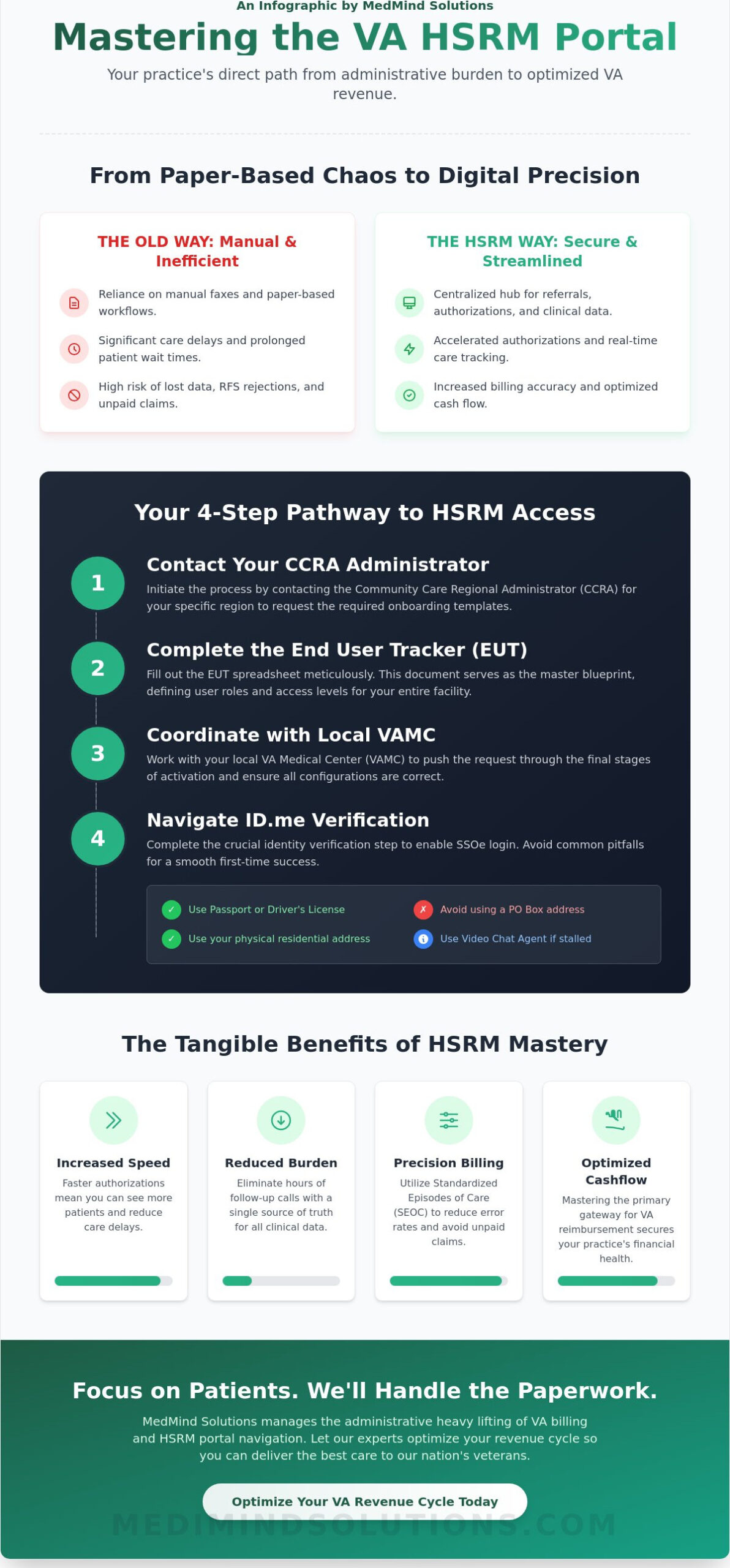
Securing access to the hsrm portal is a vital investment in your practice’s administrative health. This process ensures your team can manage referrals with clinical precision while maintaining the highest standards of data security. To begin, your facility must contact the Community Care Regional Administrator (CCRA) HSRM Administrator for your specific region. This individual serves as your primary gateway to the system and provides the necessary templates to move forward.
Once you’ve made contact, your next task is completing the End User Tracker (EUT). This spreadsheet functions as a master blueprint for your facility, defining exactly who needs access and what their responsibilities will be. You’ll then coordinate with your local VA Medical Center (VAMC) to move the request through the final activation stages. Understanding the VA’s HSRM Portal for Veteran Care is essential for any office looking to reduce wait times and improve the accuracy of their care coordination. This structured approach prevents the common errors that lead to delayed authorizations.
Navigating the ID.me Verification Process
Identity verification through ID.me is the cornerstone of the Single Sign-On internal (SSOe) login. Most delays occur during the document upload phase. To ensure a 100% success rate on your first attempt, have your primary documents ready: a valid U.S. Passport or a state-issued driver’s license. A common pitfall is using a PO Box address, which the system often flags as a high-risk indicator. Always use your residential address for personal verification. If your application stalls for more than 48 hours, use the “Video Chat Agent” option to resolve the bottleneck with a live representative.
Understanding Security Roles: Staff vs. Provider
Assigning the correct roles ensures your practice operates like a well-oiled machine. The “Community Staff” role is designed for administrative and clinical support personnel. These users can view referrals and upload medical documentation, but they cannot finalize the Request for Service (RFS) form. Only users with the “Community Care Provider” role have the authority to electronically sign the RFS. At least one credentialed provider, such as an MD, DO, NP, or PA, must be registered to keep your facility compliant. This structure protects your practice from unauthorized submissions while accelerating your reimbursement cycles. If you find the technical setup overwhelming, a Practice Checkup with our team can help identify ways to optimize your internal workflows for better financial outcomes.
By following these steps, you eliminate the friction that often plagues government portal registrations. Your practice gains the ability to track every referral in real-time, which is the first step toward achieving a more robust bottom line. Once your account is active, your team can pivot from paperwork to patient care, knowing the hsrm portal is working for you rather than against you.
Managing Referrals and the Request for Services (RFS)
The hsrm portal dashboard serves as your practice’s command center for Veteran care. When a new referral arrives, it appears in your “Referral List” with a status of “New.” You must review the clinical details and click “Accept” to move the case into your active queue. This action signals to the VA that you’re ready to begin treatment. Tracking these records from “Pending” through “Authorized” ensures your practice maintains a steady flow of patients and predictable revenue. A well-managed dashboard prevents the administrative bottlenecks that often lead to delayed care or lost revenue.
To maintain high standards of precision, your staff should monitor the status column daily. Referrals typically move through several stages:
- Pending: The VA has initiated the request but hasn’t finalized the details.
- Active: The referral is ready for your team to schedule the Veteran.
- Authorized: The clinical services are approved for reimbursement.
Mastering the Electronic RFS Form
Submit a Request for Services (RFS) using the digital VA Form 10-10172 when a Veteran needs specialty care or continued treatment beyond the initial authorization. You’ll find that aligning your RFS with the original Standardized Episode of Care (SEOC) is vital for rapid approval. If your request falls outside the SEOC parameters, the VA may deny it, which disrupts the patient’s recovery. Using electronic signatures within the hsrm portal accelerates the “Time to Care” by eliminating paper-based delays. This digital approach can reduce authorization wait times by as much as 50 percent compared to traditional faxing methods, keeping your practice’s financial health robust.
Sharing Clinical Results and Closing the Loop
Precision in documentation is the backbone of your practice’s stability. Upload clinical results directly to the portal to satisfy VA requirements and ensure final claim adjudication. Missing records often cause 30-day payment delays or outright denials. By attaching clinical notes, lab results, and imaging directly to the referral record, you provide the VA with the data they need to authorize future care. This skillful management of PHI keeps your practice HIPAA-compliant while eliminating the “heavy lifting” of manual record transfers.
Use the portal’s messaging feature to communicate directly with VA clinicians. This collaborative approach ensures every exchange remains secure while fostering a perfect match between your provider’s expertise and the Veteran’s specific medical needs. Timely documentation isn’t just a regulatory hurdle; it’s a KPI for your practice’s efficiency. When you close the loop quickly, you see your savings grow through faster collections and reduced administrative rework.
Troubleshooting Common HSRM Portal Issues
Technical glitches in the hsrm portal can disrupt your workflow and delay vital patient care. Maintaining a robust connection to the VA’s system is essential for your practice’s financial health. When SSOe login errors occur, verify your credentials first. If you’re locked out, wait 15 minutes before attempting a password reset. Persistent login failures often mean your account was deactivated due to 90 days of inactivity, requiring a call to the help desk for reactivation.
If a referral is missing from your facility’s inbox, don’t panic. Check the “Facility” view rather than just your personal inbox. Often, the referral is assigned to the organization but hasn’t been claimed by a specific user yet. Ensure the VA has your correct Tax ID and NPI on file. A mismatch in these identifiers prevents referrals from populating correctly in the system.
- Security Group Mismatches: If you can see a referral but can’t submit forms, your user role likely lacks the proper permissions. Contact your local administrator to align your Security Group with your actual job functions.
- End User Tracker (EUT) Updates: Manage staff turnover with precision. Update the EUT within 24 hours when a team member leaves to prevent unauthorized access and maintain HIPAA compliance.
Technical Support and Point of Contact (POC) Resources
Distinguishing between technical bugs and clinical questions saves your team hours of frustration. Contact the HSRM Help Desk at 844-293-2272 for system errors, login issues, or browser compatibility problems. For questions regarding specific clinical authorizations or missing patient data, reach out to your local VAMC Community Care Research and Accountability (CCRA) Team. Keep the HSRM Community Provider User Guide bookmarked for step-by-step resolution of complex data entry errors. This guide provides the clinical precision needed to navigate advanced system features.
Optimizing Workflow to Prevent Denials
A proactive “Practice Checkup” approach ensures your revenue remains steady and your cash flow stays optimized. Conduct a weekly audit of your hsrm portal activity to catch expired authorizations before they result in “unauthorized care” claim denials. These errors are costly. They often lead to a 100% loss of reimbursement for services rendered. Ensure data consistency by cross-referencing HSRM authorization numbers with your internal EHR system every Tuesday and Thursday. This meticulous attention to detail protects your bottom line and keeps your practice’s fiscal status healthier than ever.
Optimizing Your VA Revenue Cycle with MedMind Solutions
Managing the hsrm portal shouldn’t pull you away from your patients. MedMind Solutions handles the heavy lifting of VA administration, ensuring your practice remains healthier than ever. We offer the best of both worlds; you focus on clinical excellence while our skillful billing specialists deliver financial precision. By integrating HSRM workflows into a robust Revenue Cycle Management strategy, we eliminate the friction that often slows down Veteran care reimbursements. Our team acts as your meticulous growth partner, transforming a complex government portal into a streamlined engine for your practice’s success.
Professional Credentialing and Enrollment Services
Enrollment in the VA network is notoriously complex, but it doesn’t have to be a source of stress. We manage your CAQH profiles and primary source verification to maintain strict VA compliance at all times. Our specialists ensure every provider is correctly mapped within the hsrm portal to prevent administrative bottlenecks. This meticulous attention to detail ensures that your mapping is accurate, which is essential for maximizing your reimbursement potential and avoiding “missing provider” errors during the claims process. We handle the paperwork, so you can handle the healing.
- Vigilant Compliance: Continuous monitoring of credentialing status to avoid service interruptions.
- Accurate Mapping: Precise provider alignment within HSRM to ensure every referral is captured.
- Reduced Overhead: Elimination of the need for in-house staff to master complex VA-specific software.
Data-Driven Financial Health for Your Practice
Experience the relief of a practice that operates with peak efficiency and total transparency. Our precision billing systems reduce days in A/R significantly, ensuring that Veteran care payments reach your bank account faster. We’ve seen these optimizations lead to a revenue increase of $26,000 per provider on average. We provide custom financial reporting that tracks VA-specific KPIs, giving you a clear view of your practice’s growth and profitability. You’ll see exactly how your VA volume translates into tangible financial health through our detailed analytics dashboards.
Our approach combines technical authority with a warm, partnership-oriented style. We don’t just process claims; we protect your bottom line by eliminating errors and identifying missed revenue opportunities. If you’re ready to see your savings grow and your administrative burden shrink, it’s time for a professional intervention. Optimize your bottom line with a MedMind Practice Checkup today!
Stop struggling with the complexities of the hsrm portal alone. Let our group of skillful billing specialists turn your VA community care department into a high-performing asset. Your practice deserves the stability and security that comes with expert financial management.
Elevate Your Practice Efficiency and Veteran Care Standards
Mastering the hsrm portal is a critical step in ensuring your practice remains a reliable partner for the VA Community Care Network. By streamlining how you manage referrals and service requests, you eliminate the administrative friction that often delays essential veteran care. Successful navigation of this system isn’t just about technical proficiency; it’s about securing the financial health of your practice. When your team can navigate the portal with precision, you reduce claim denials and accelerate your reimbursement cycles.
MedMind Solutions serves as your Meticulous Growth Partner, providing the clinical precision and financial expertise your practice needs to thrive. Our specialists focus exclusively on VA and VACCN billing compliance, removing the burden of complex paperwork from your staff. We’ve helped providers achieve an average revenue increase of $26,000 by identifying missed opportunities and optimizing billing workflows. This robust support ensures your practice stays profitable while you focus on delivering high-quality care to those who served.
Take the next step toward a more efficient, profitable practice today. Partner with MedMind Solutions for Expert VA Billing Support and see how a skillful approach to your revenue cycle makes everything run smoother. Your practice is in expert hands, and we’re ready to help you grow.
Frequently Asked Questions
What is the HSRM portal used for?
The HSRM portal is a secure, web-based system used by community providers and VA staff to manage Veteran referrals and authorizations efficiently. It streamlines the exchange of clinical documentation and provides real-time tracking of patient care coordination. By using the hsrm portal, you eliminate the delays of faxing and ensure your practice maintains a robust workflow for every VA patient you treat.
How do I get an ID.me account for HSRM?
You must visit the official ID.me website to create a secure digital identity credential that meets federal security standards. Once you provide your legal name, social security number, and a government-issued photo ID, the verification process typically completes in under 15 minutes. This credential acts as your digital key, ensuring that sensitive PHI remains protected while you access essential federal systems.
Can my staff use the HSRM portal on my behalf?
Yes, your staff can access the system once you designate them as authorized users within your organization’s profile. Each staff member must create their own individual ID.me account to maintain security protocols and audit trails. Assigning specific roles to your administrative team optimizes your bottom line by allowing you to focus on clinical care while they handle the heavy lifting of referral management.
How do I request additional visits for a Veteran through HSRM?
You submit a Request for Service (RFS) directly through the portal by navigating to the specific Veteran’s active referral. You’ll need to upload clinical justification and specify the exact number of additional visits required for the patient’s treatment plan. This digital submission reduces the 30 day wait times often associated with manual paperwork, leading to faster approvals and uninterrupted care for the Veteran.
What should I do if a VA referral is not showing up in the portal?
Contact the referring VA Medical Center (VAMC) directly to ensure they’ve correctly published the referral to your specific Tax Identification Number (TIN). If the referral was issued before the 2019 MISSION Act implementation, it might not appear in the digital system. Verifying the NPI and TIN linkage within the hsrm portal settings often resolves 95 percent of visibility issues for community providers.
Is HSRM the same as the VACCN portal?
No, HSRM is the VA’s system for clinical referral management, while the VACCN portal, managed by Third Party Administrators like Optum or TriWest, is primarily for claims and billing. While both are vital for your practice’s financial health, HSRM focuses on the clinical exchange and authorization side of the partnership. Using both systems in tandem ensures you achieve clinical clarity and precision billing for every claim.
How long does it take for an HSRM registration to be processed?
The standard processing time for a new HSRM account registration is between 3 to 5 business days. This timeframe depends on the accuracy of your submitted organizational details and the verification of your facility’s NPI. Once the VA’s HSRM Help Desk approves your request, you’ll receive an automated email notification to begin your first login and start managing your Veteran patient load.
Does using HSRM guarantee payment for services?
Using the portal confirms that a service is authorized, but it doesn’t serve as a guarantee of final payment. You must still submit clean claims with the correct CPT codes to the appropriate TPA for reimbursement. However, having a digital record of the authorization in the system provides a robust defense against claim denials, helping you maintain a healthier cash flow for your medical practice.